Every custom WAF rule is built from four parts: a variable that tells the engine where to look in a request, an operator that defines the match condition, optional transformations that normalize the data before comparison, and a response action for matches.
The fundamentals
A WAF rule is structured into four main sections, each playing a vital role in the request evaluation process:
- Variable: This section specifies the parts of the HTTP request that the Rule Engine should examine. By defining a Variable, you instruct the WAF on where to look within the request, such as headers, URIs, or parameters.
- Operator: Operator defines the condition or logic that triggers a match against the specified Variable (and Variable Value). It determines how the extracted data is compared to a given value, using operations like equality, pattern matching, or range checking.
- Transformations: Before evaluation, the extracted data can be normalized or transformed for consistent matching, such as converting it to lowercase or stripping whitespace.
- Response Action: Upon a successful match, Response Action specifies what the WAF should do with the request. Actions can include blocking the request, logging it for analysis, or issuing a challenge to the client.
A very basic rule would look like the following:
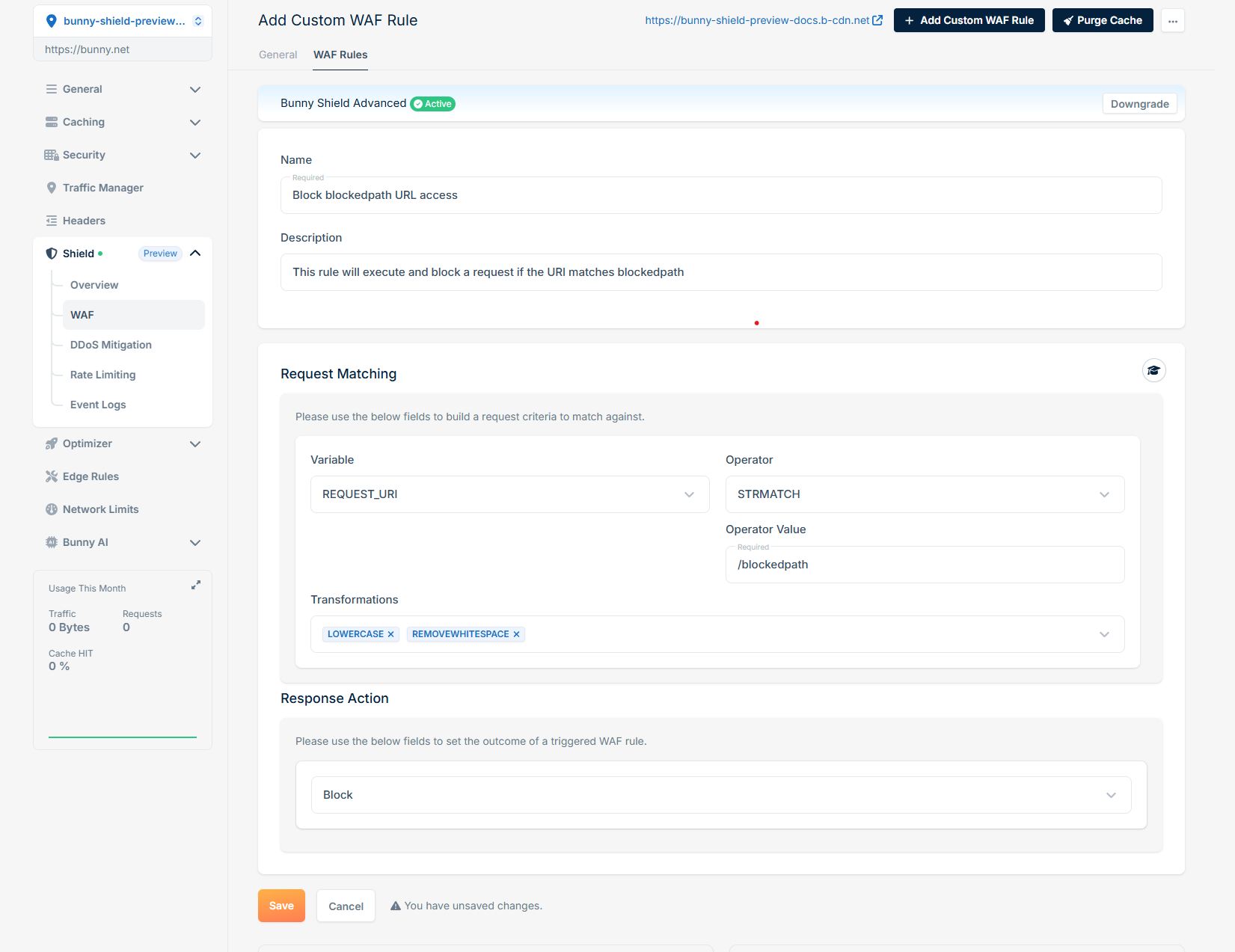 This rule processes each HTTP request by extracting only the REQUEST_URI (Variable), converting it to lowercase, and removing whitespaces (Transformations). It then verifies if the transformed REQUEST_URI matches exactly (Operator) with ‘/blockedpath’ (Operator Value). If a match is found, our WAF Engine will block (Response Action) the request, halting further rule processing and intercepting the request.
Variables
Variable define where in the HTTP request the WAF should extract data for evaluation. Each Variable corresponds to a specific element of the request.
REQUEST_URI The full URI of the incoming request (e.g., /path/to/resource?query=123).REQUEST_URI_RAW The raw, unprocessed URI, possibly including encoded values (e.g., %2F instead of /).ARGS (Optional Variable Value) All request parameters (both GET and POST).ARGS_COMBINED_SIZE The combined size (in bytes) of all request arguments.ARGS_GET (Optional Variable Value) All query parameters passed via the GET method.ARGS_GET_NAMES (Optional Variable Value) The names (keys) of query parameters in the GET method.ARGS_POST (Optional Variable Value) All request parameters passed via the POST method.ARGS_POST_NAMES (Optional Variable Value) The names (keys) of parameters in the POST method.FILES_NAMES The names of uploaded files in the request.GEO (Optional Variable Value - COUNTRY_CODE, LATITUDE, LONGITUDE, ASN, CITY, CONTINENT, ORGANIZATION) (Advanced) The geo location information of the client making the request. With no Variable Value, returns all components.REMOTE_ADDR The IP address of the client making the request.QUERY_STRING The raw query string of the request (e.g., ?key=value&name=example).REQUEST_BASENAME The base name of the requested file (e.g., index.html).REQUEST_FILENAME The full path of the requested file (e.g., /var/www/index.html).REQUEST_LINE The complete HTTP request line (e.g., GET /index.html HTTP/1.1).REQUEST_METHOD The HTTP method used in the request (e.g., GET, POST, PUT).REQUEST_PROTOCOL The HTTP protocol version (e.g., HTTP/1.1, HTTP/2).REQUEST_COOKIES_NAMES (Optional Variable Value) The names of cookies sent in the request.REQUEST_COOKIES (Optional Variable Value) All cookie key-value pairs sent with the request.REQUEST_HEADERS_NAMES (Optional Variable Value) The names of headers included in the request.REQUEST_HEADERS (Optional Variable Value) All request headers in a key-value pair format.REQUEST_BODY (Premium) The textual payload of the request body.RESPONSE_HEADERS (Optional Variable Value) All response headers sent back to the client.RESPONSE_BODY (Premium) The textual payload of the response body returned by the origin server.RESPONSE_STATUS The HTTP status code returned in the response (e.g., 200 OK, 404 Not Found).FINGERPRINT (Optional Variable Value - JA4_A, JA4_B, JA4_C and any two-letter combination such as JA4_AB) (Premium) The TLS client fingerprint of the request. With no Variable Value, returns the full JA4 string.VERIFIED_BOT_CATEGORY The category assigned by verified-bot detection, e.g. SEO for verified search-engine crawlers, or empty when the client is not a recognized verified bot.
Operator
Operator determines the condition under which a match is triggered. It defines how the WAF compares the extracted and transformed data against the specified value.
BEGINSWITH Check if a string starts with a specified substring.ENDSWITH Check if a string ends with a specified substring.CONTAINS Check if a string contains a specified substring.CONTAINSWORD Check if a string contains a specific whole word (whitespace-delimited).WITHIN Check if the variable value appears as a substring within the operator value (the inverse of CONTAINS).STRMATCH Substring match against the operator value. Functionally equivalent to CONTAINS.STREQ Check if a string has exact match, case insensitive.EQ Equality check: whether two integers are exactly equal.GE Check if an integer/double is Greater than or equal to.GT Check if an integer/double is Greater than.LE Check if an integer/double is Less than or equal to.LT Check if an integer/double is Less than.RX Regular expression match.DETECTSQLI (Advanced) Detect SQL injection attempts in input.DETECTXSS (Advanced) Detect cross-site scripting (XSS) attempts in input.
Transformations are applied to the extracted data before evaluation to normalize or modify it, ensuring consistent comparisons.
CMDLINE Preprocess input as if it were a command-line string (e.g., handling escape sequences or arguments).COMPRESSWHITESPACE Replace multiple whitespace characters (spaces, tabs, newlines) with a single space.CSSDECODE Decode CSS-encoded input (e.g., %2F in CSS or \00002F encoding).HEXENCODE Encode the input as hexadecimal (e.g., abc → 616263).HTMLENTITYDECODE Decode HTML entities (e.g., < → <, A → A).JSDECODE Decode JavaScript-encoded strings, such as escape sequences in JS (e.g., \x41 → A).LENGTH Return the length of the input string.LOWERCASE Convert input to lowercase (e.g., Hello → hello).MD5 Hash the input using the MD5 hashing algorithm.NORMALIZEPATH / NORMALISEPATH Normalize file paths by removing redundant parts (e.g., /a/../b → /b).NORMALIZEPATHWIN / NORMALISEPATHWIN Normalize file paths specific to Windows-style paths (e.g., C:\\folder\\..\\file → C:\file).REMOVECOMMENTS Remove comments from input, such as <!-- --> in HTML or /* */ in CSS/JS.REMOVENULLS Remove null bytes (\x00) from the input.REMOVEWHITESPACE Remove all whitespace from the input (e.g., a b c → abc).REPLACECOMMENTS Replace comments in the input with a placeholder or empty string.SHA1 Hash the input using the SHA-1 hashing algorithm.URLDECODE Decode standard URL-encoded input (e.g., %2F → /).URLDECODEUNI Decode URL-encoded input with Unicode normalization (handles double-encoded payloads).UTF8TOUNICODE Convert UTF-8 encoded input to Unicode.
Response Actions
Response Actions specifies the action the WAF takes when a rule condition is met.
Block Block the request.Log Log the request.Challenge (Advanced) Challenge the request with JS PoW.
Last modified on May 19, 2026

