By integrating this GitHub Action into your workflow, you can enhance the reliability of your deployment process and reduce the need for manual intervention, allowing you to focus on developing reliable, scalable applications for edge networks.
Example usage
The following GitHub workflow file example demonstrates how to configure this action to deploy a script automatically whenever there is a push to the main branch:
Inputs
To use this GitHub Action, you will need to provide the following inputs: script_id (required):
- The ID of the script you wish to deploy. This should be securely stored as a GitHub secret (
SCRIPT_ID).
deploy_key: The deployment key used to authorize the deployment of the script. This should also be securely stored as a GitHub secret (DEPLOY_KEY).- file (required): The path of the script file that will be deployed. Ensure this file exists in your repository or that preceding actions generate it.
The script ID and deploy key are available in the dashboard under Script -> Deployments -> Settings.
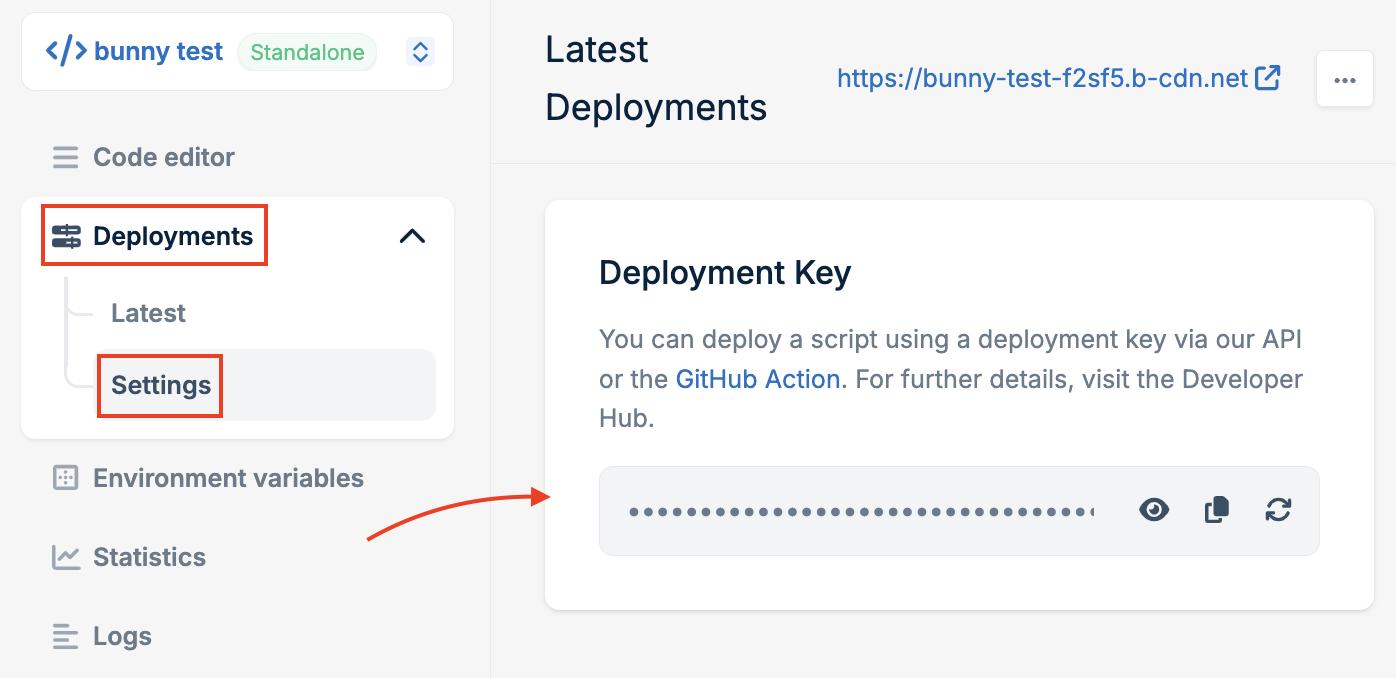 You should place the workflow file in the .github/workflows folder in your repository. You can adjust the workflow file to suit your own build and deployment pipeline. You can learn more about building workflows in the official GitHub documentation.
Setting up secrets
To ensure your script_id and deploy_key remain secure, follow these steps to store them as secrets in your GitHub repository:
- Navigate to your GitHub repository.
- Click on Settings.
- Select Secrets and variables.
- Choose Actions.
- Click New repository secret.
- Add
SCRIPT_ID and DEPLOY_KEY as the names of the secrets and provide their respective values.
Last modified on December 1, 2025

