

If Bunny Optimizer is enabled, WebP and URL Query String vary
settings are automatically turned on for image files.
Configure Vary Cache
1
Open your Pull Zone
Go to your Pull Zone in the dashboard and click Caching in the side menu.
2
Open the General panel
Click General inside the Caching section.
3
Select Vary Cache behaviors
Enable the desired Vary Cache options (WebP, AVIF, Query String, etc.).
4
Save your configuration
Click Save Vary Configuration.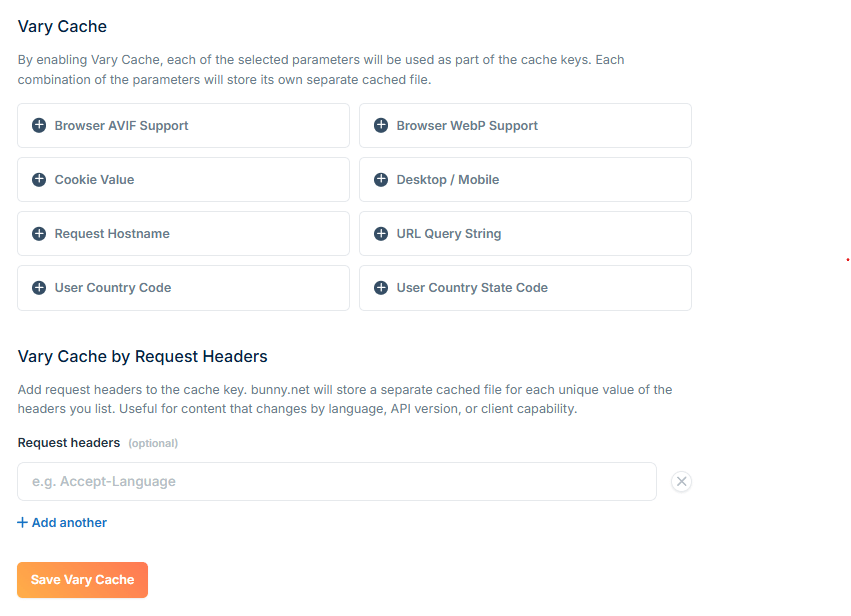
Vary Cache settings
WebP support
Stores separate cached versions based on whether the browser supports WebP images. When enabled, browsers that support WebP receive WebP-optimized content while others receive the original format—all from the same URL. Only applies to these extensions:jpg, jpeg, webp, png, gif
AVIF support
Similar to WebP, this varies the cache based on the browser’s ability to display AVIF images. Useful for serving next-gen image formats to supported browsers.URL Query String
By default, query strings are ignored when constructing the cache key. These URLs would all return the same cached file:- Dynamic responses generated from query parameters
- Cache busting via versioned URLs
- Bunny Optimizer transformations
User Country Code
Includes the end-user’s GeoIP country code in the cache key. Your origin can return different content based on theCDN-RequestCountryCode header, and each country-specific version is cached separately.
Requested Hostname
Uses the hostname from the request as part of the cache key. With this enabled, requests tocdn.example.com and example.b-cdn.net on the same Pull Zone are cached separately.
This allows your origin to return different content based on the requested domain. Combine with the Forward Host Header setting so your origin receives the actual hostname.
Mobile/Desktop
Varies the cache based on whether the request comes from a mobile or desktop device, determined by the User-Agent header. When enabled, Bunny sends aCDN-MobileDevice header to your origin with a value of true or false. Your origin can use this to serve device-appropriate content (such as different image sizes), and each version is cached separately.
Cookie
Varies the cache based on specific cookie values. When enabled, enter the cookie names you want to use as part of the cache key.Still seeing cookies on your CDN domain after enabling Disable Cookies? The Disable Cookies feature strips
Set-Cookie headers traveling over the CDN, but it can’t remove wildcard cookies, for example a .example.com cookie set by Google Analytics, because those are set directly by your main domain rather than the CDN. They have practically no performance impact. To avoid them entirely, serve the CDN from a domain that isn’t a subdomain of your site, or use the b-cdn.net hostname.Custom header-based vary is available via internal configuration. Contact
support@bunny.net if you need to vary cache on a
header not listed here.
Request Headers
Varies the cache based on the value of one or more request headers. When enabled, enter the header names you want to include as part of the cache key. This allows your origin to return different content for the same URL while still benefiting from CDN caching. Common use cases include:- Localized content using Accept-Language
- Feature flags and staged rollouts using custom headers
- API responses that vary by client capabilities
- Device-specific experiences using custom application headers
Accept-Language creates separate cache entries for requests such as:
Cache key impact
Each vary setting you enable multiplies the number of cached versions per URL:
Enabling multiple settings compounds this effect. For example, WebP + Mobile + Country Code could create
2 × 2 × 195 = 780 cached versions of a single URL.